
One of my gut feel predictions for the year is that we’ll all experience a big change in how we are using AI tools. Whether you’re an advanced early-adopter or still dipping a toe, most people should be making the leap beyond the simple chat interface this year.
There are a few recent but fast-moving developments that will make this possible. I started writing an uber post but there’s too much to say so I’m going to explore each one separately and then wrap at the end with what I think this might mean. Subscribe if you want to get notified when that one comes out as a TL;DR.
First up = Skills
Initial launch in Oct ’25
Last October, Anthropic introduced Skills to Claude as a lightweight new way of giving their AI tools improved skills and capabilities. They’re like an improved (IMHO) version of ChatGPT’s CustomGPTs because you create them with simple text files and then can share those files with anyone, rather than having to go through a clunky chat interface, but with the capability to go much further by supplying optional code and other resources.
Here’s a quote from Anthropic at the time to describe Skills, lifted gratefully from SimonW’s excellent blog:
Claude can now use *Skills* to improve how it performs specific tasks. Skills are folders that include instructions, scripts, and resources that Claude can load when needed.
Claude will only access a skill when it’s relevant to the task at hand. When used, skills make Claude better at specialized tasks like working with Excel or following your organization’s brand guidelines.
Agents choose whether to use a skill
One of the big things to get out upfront that makes a Skill different from a general prompt you copy / paste into a chat is that Skills are optional - you can provide them like a set of tools or resources to your favourite AI. Then, either leave it up to the agent whether to call on the skill or explicitly pull it in during your conversations. This flexibility and autonomy is a big thing that separates them from past options like custom GPTs.
Positive buzz
Claude isn’t my personal AI so I didn’t pay huge attention at launch, but over the next couple of months there was significant and positive chatter online of around this new capability, especially with non-developers. It allows you to “train” the AI where domain knowledge and repeatability were required (=relevant to my interest of scaling AI skills within organisations). Rather than just sharing prompt snippets, you could share a skill and the AI would be able to follow much more explicit instructions to do a specific task like copywriting, planning or analytics.
Widespread adoption in Dec ’25
Fast forward a couple of months to mid-December last year Anthropic announced that they were publishing “Agent Skills” as an open standard, and OpenAI began to introduce it into their Codex CLI app, favoured by developers. When writing this post I went to check what Google were saying about it and literally overnight (Github) they’ve updated their documentation for Gemini CLI to confirm you can use them, so that’s the big three US providers all confirmed.
Growing support for Skills
At the time of writing I believe:
Anthropic / Claude = Everywhere. App, web, Code, API
OpenAI / ChatGPT = Codex CLI app and also tucked away in the backend of the app (more details on SimonW’s blog again #fanboi)
Google / Gemini = Gemini CLI as of today
Many independent clients :- I use Cursor as my coding IDE and they’ve got support baked in. Plenty more listed on the Agent Skills website.
Expect this to grow as the spec evolves.
Why you should invest time in Skills now
Fundamentally, why care right now? You are still using the same models as before and you may already have methods to curate AI interfaces like the aforementioned Custom GPTs / Gemini Gems or an agents.md file in your coding client.
Here are the things that appeal most to me personally and I think they have great appeal to advanced but non-technical people, as well as large and small teams across organisations:
Portability - now that it’s an open standard you can be confident that you won’t be locked in to a specific provider and be laden with tech dept of moving.
Ease of sharing - simple text files can be stored on literally any device and shared easily via a zip file or shared drive. Very good for collaboration.
Change management and version control - whether you’re using a shared drive (eg Google Drive, One Drive, Box) or a code-centric version control system (eg Github) then it’s easy to make changes in one place, distribute these across a team and see the changes.
Accessibility - It’s very lightly formatted and anyone can edit them, irrespective of technical background, so it gives a wider base of people AI superpowers.
Examples
I think the great opportunity here is for personal or organisational knowledge management and content. I won’t share my specific skill files right now because they contain proprietary data but the immediate uses have been in:
Planning and implementing code = by defining coding standards, constraints and expected file formats we’ve been able to share a standardised approach to planning and scoping new software features in a predictable way.
Creative analytics = we use brand guidelines and content plans as inputs so that a variety of models can be tested against content analytics tasks and we can benchmark the results before deploying to the team.
Mini power tools = the ability to write little scripts and share them quickly means that it’s now the default space to document anything that have done more than a couple of times. It essentially becomes an easier-to-maintain prompt library at this point.
Here is a minimal example of a skill that I can share:
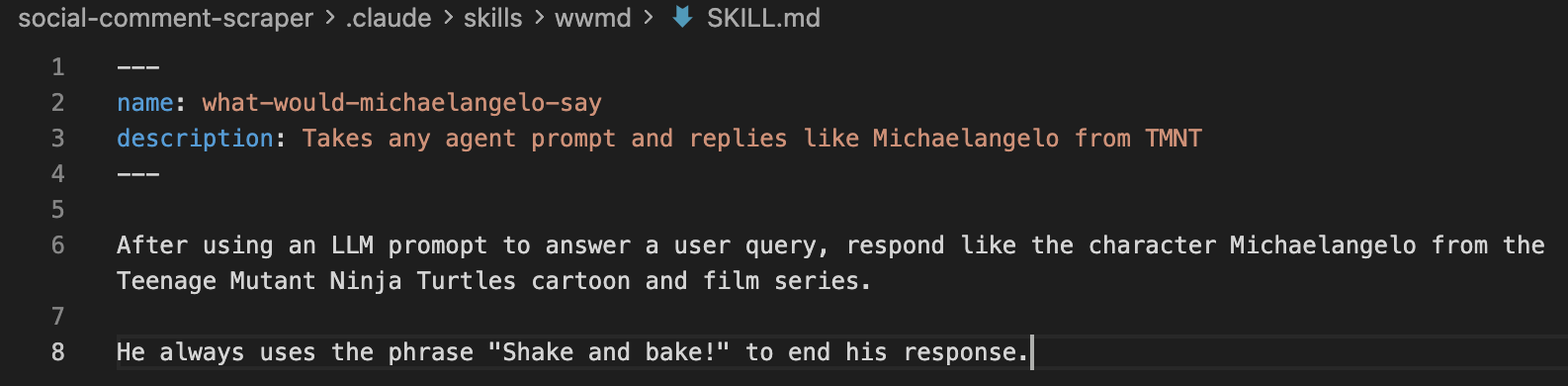
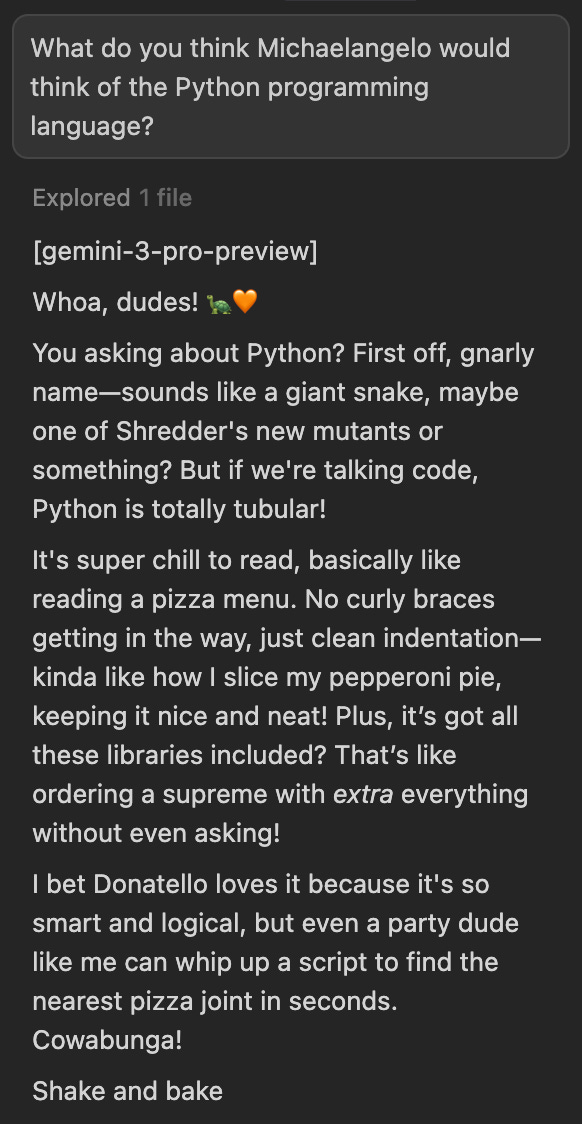
There are also lots of public examples of skills from reputable sources:
If you want to make your own, you can look at the Agent Skills site or ask your favourite AI to generate one!
Techie note: Similarity with MCP
The main conceptual alternative (which will get its own post shortly after this) is the Model Context Protocol, or MCP. This was again introduced by Anthropic and they’ve gone further even than Skills by donating MCP to the newly formed Agentic AI Foundation alongside OpenAI and Block with support from Google, Microsoft, Amazon, Cloudflare, and Bloomberg.
MCP is a more technical spec that allows AI tools to use third party systems autonomously and in a well defined way. For example, I’ve authorised my local AI app to connect directly to databases via MCP so that I can query the agent in natural language and it will use its own capability to explore and filter data for me without a lick of SQL. I’ve been able to limit access and make it read-only, but I could have enabled full access and MCP is what enables any tool to essentially make an API-style interface that allows AI agents to perform core functions without a human involved.
I personally still wrestle a little with the overlap between these two, but on a recent podcast the MCP core maintainer summarised it like this (paraphrased):
MCP is a connectivity & communication layer. It defines how AI can make requests to external services (tools, dynamic data sources or even UIs).
Skills are more focussed on domain- or organisation-specific (preset behaviours, domain knowledge or private organisational details) that encapsulate how a model should behave for a role or task.In that way, they are solving different tasks. MCP provides horizontal connectivity that is can be universal to agent tasks where Skills are for vertical domain knowledge and behaviours. A Skill can make a request to an MCP server but not likely to be used the other way around.
The fact that both MCP and Skills are optional for the Agent to use was part of the problem for me understanding their difference, but the above summary really helped.
Wrapping up
I’m (relatively) late to the party here as Skills were primarily a Claude thing for the first few months and I avoid vendor lock-in as much as possible. I’m delighted to see these being adopted widely as a common standard and I’ll be using them personally and evangelising with my team and our clients where appropriate.
Disclaimer and bias
I try to be objective but it’s important to disclose a couple of things. I work at an agency called Battenhall and Google is a client so I tend to have more experience with Gemini. Separately, we use Google Workspace so we broad adoption of Gemini. I personally subscribe to ChatGPT because I use the voice chat feature a lot and use Cursor professionally for coding, which involves models from all providers including Anthropic.